


Email is one of the most essential communication tools for modern businesses, but it is also the most common gateway for cyberattacks. Every day, organizations receive hundreds or even thousands of emails, making it difficult to distinguish legitimate messages from malicious ones. Cybercriminals take advantage of this by sending phishing emails, malware infected attachments, ransomware, and fraudulent messages that appear genuine. A single click on a malicious email can lead to data theft, financial loss, business disruption, or even a complete security breach.
As these threats continue to evolve, businesses need more than a basic spam filter. They require a comprehensive Email Security Gateway that can intelligently inspect every incoming and outgoing message, detect suspicious activity, and prevent cyber threats before they reach users. By combining advanced threat intelligence, artificial intelligence, and real time email analysis, an Email Security Gateway provides organizations with a strong first line of defense against modern cyber threats while significantly reducing the risk of spam and email attacks.
What Is an Email Security Gateway?
An Email Security Gateway is a specialized security solution that protects business email by filtering, monitoring, and securing incoming and outgoing email traffic before it reaches users' inboxes. It acts as a protective layer between external senders and your organization's email environment, analyzing every message for suspicious behavior, malicious attachments, harmful links, and unauthorized senders.
To better understand what is email security, think of it as the overall process of protecting email communications from cyber threats such as spam, phishing, malware, ransomware, and data breaches. While email security includes multiple technologies and security policies, an Email Security Gateway is one of the most important components because it stops threats before they can reach employees.
Why Are Email Threats Increasing?
Cybercriminals continue to target email because it remains one of the easiest ways to deceive employees. Rather than attacking networks directly, attackers manipulate users into opening malicious attachments, clicking fake links, or sharing confidential information.
Some of the most common threats include:
Spam campaigns
Phishing emails
Spear phishing attacks
Business Email Compromise (BEC)
Malware distribution
Ransomware delivery
Credential theft
Fake invoice scams
As these attacks become more sophisticated, organizations need an Email Security Gateway capable of identifying evolving threats before they enter the network.
Without proper protection, spam and email attacks can quickly spread throughout an organization, causing severe operational and financial consequences.
How an Email Security Gateway Prevents Spam Attacks
One of the most important functions of an Email Security Gateway is stopping unwanted and malicious spam before it reaches employees' inboxes. Unlike traditional spam filters that rely mainly on keywords, modern email security gateways use advanced threat detection techniques to accurately identify suspicious messages without blocking legitimate business communications.
Every incoming email is analyzed using multiple security checks. The gateway evaluates the sender's reputation and IP address to determine whether the message originates from a trusted source. It also verifies domain authenticity to detect spoofed or fraudulent email addresses that cybercriminals commonly use. These advanced security measures also help protect organizations from phishing attempts. If you're wondering what is the phishing attack, it is a cyberattack where attackers use deceptive emails to trick recipients into revealing sensitive information, clicking malicious links, or downloading harmful attachments. An Email Security Gateway detects and blocks these threats before they reach users' inboxes.
How Email Security Gateway Analyzes Every Email
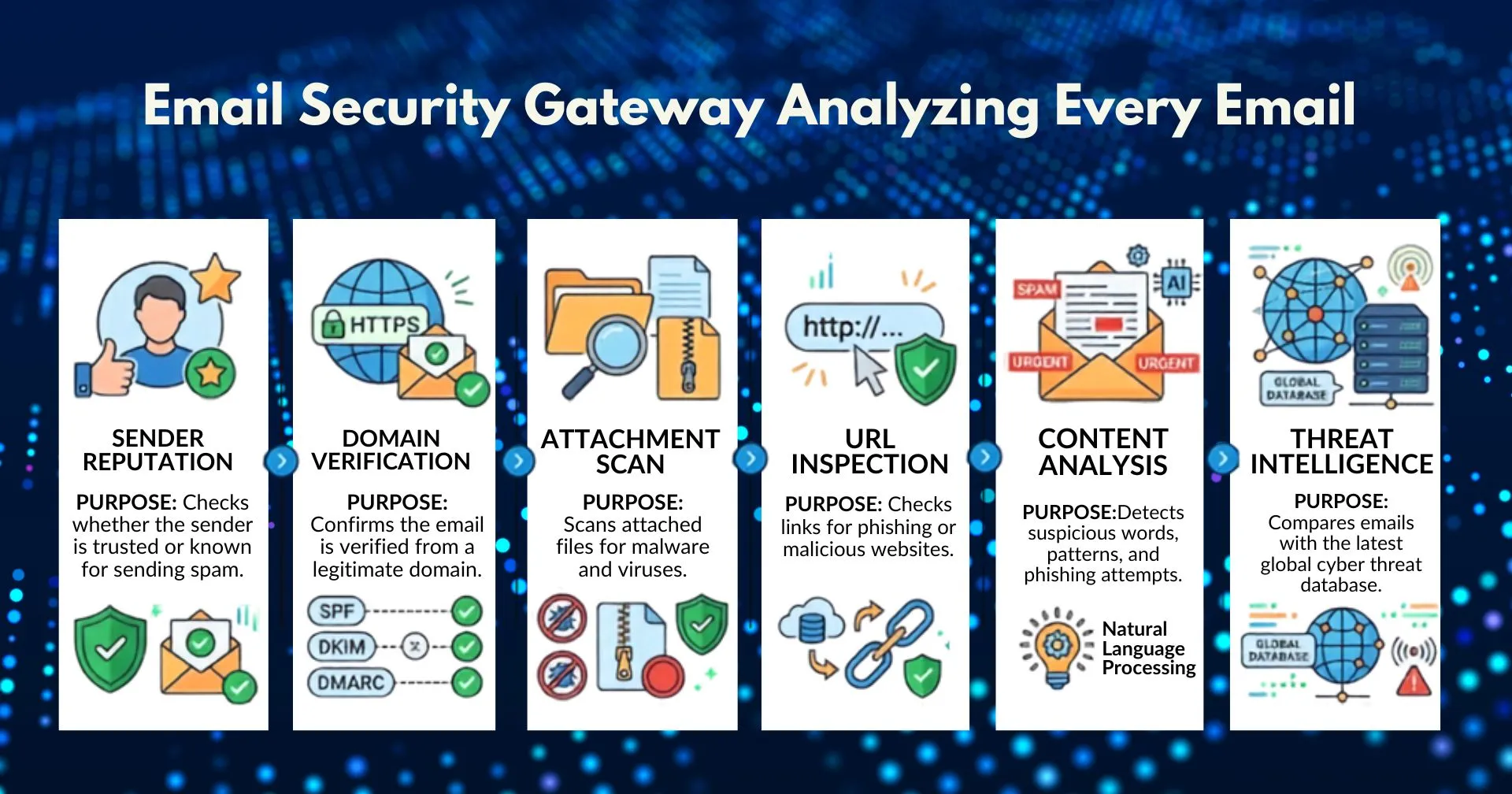
Security Check | Purpose |
|---|---|
Sender Reputation | Checks whether the sender is trusted or known for sending spam. |
Domain Verification | Confirms the email is sent from a legitimate domain. |
Attachment Scan | Scans attached files for malware and viruses. |
URL Inspection | Checks links for phishing or malicious websites. |
Content Analysis | Detects suspicious words, patterns, and phishing attempts. |
Threat Intelligence | Compares emails with the latest global cyber threat database. |
Essential Features to Look for in an Email Security Gateway
Not every security solution offers the same level of protection.
When evaluating providers, businesses should consider features such as:
Cloud based deployment
Real time threat intelligence
AI-powered phishing detection
Multi engine antivirus scanning
Attachment sandboxing
URL protection
Email encryption
Data Loss Prevention (DLP)
Outbound email scanning
Quarantine management
Detailed reporting and analytics
Easy integration with Microsoft 365 and Google Workspace
High email availability
Automatic software updates
Selecting the right Email Security Gateway ensures comprehensive protection against modern cyber threats while simplifying administration.
Best Practices for Maximizing Email Security
Even with advanced technology, organizations should combine security solutions with strong cybersecurity practices.
Recommended best practices include:
Enable Multi Factor Authentication (MFA)
Train employees to recognize phishing attempts
Regularly update email security policies
Monitor suspicious login activity
Restrict dangerous attachment types
Use strong password policies
Review quarantine reports regularly
Keep software and operating systems updated
Combining these practices with an Email Security Gateway creates a layered defense strategy that significantly reduces cybersecurity risks.
Best Practices for Maximizing Email Security
Even with an advanced Email Security Gateway, organizations should follow strong cybersecurity practices to build a layered defense against modern email threats. The following best practices help reduce the risk of phishing, malware, ransomware, and unauthorized access.
1. Enable Multi Factor Authentication (MFA)
Adding Multi-Factor Authentication (MFA) provides an extra layer of security by requiring users to verify their identity with more than just a password. Even if login credentials are stolen, MFA helps prevent unauthorized access to business email accounts.
2. Educate Employees About Phishing Attacks
Regular cybersecurity awareness training helps employees recognize phishing emails, suspicious links, fake attachments, and social engineering tactics. Well informed employees are less likely to fall victim to email-based attacks.
3. Strengthen Email Security Policies
Review and update your organization's email security policies regularly. Restrict high-risk attachment types, enforce strong password requirements, and monitor suspicious login activity to reduce potential vulnerabilities.
4. Keep Systems and Software Updated
Ensure email platforms, operating systems, antivirus software, and business applications are always updated with the latest security patches. Regular updates help protect against newly discovered vulnerabilities and emerging cyber threats.
5. Monitor and Review Email Security Reports
Regularly review quarantine reports, security alerts, and email activity logs to identify suspicious behavior. Continuous monitoring allows IT teams to detect potential threats early and respond before they impact the organization.
Essential Features to Look for in an Email Security Gateway
When choosing an Email Security Gateway, focus on features that provide comprehensive protection against modern email threats while remaining easy to manage.
Cloud-Based Deployment – Protects email without requiring on-premises hardware.
AI-Powered Threat Detection – Identifies phishing, spoofing, and emerging email attacks.
Real Time Malware Protection – Scans attachments and URLs before delivery.
Email Authentication – Supports SPF, DKIM, and DMARC to prevent spoofing.
Data Loss Prevention (DLP) – Prevents sensitive information from leaving the organization.
Email Encryption – Secures confidential emails during transmission.
Quarantine & Reporting – Isolates suspicious emails and provides detailed security insights.
Microsoft 365 & Google Workspace Integration – Ensures seamless deployment with popular email platforms.
A modern Email Security Gateway should combine these features to deliver strong protection, improve email security, and reduce administrative effort.
Stop Spam, Phishing & Malware Before They Reach Your Inbox
Your organization deserves more than basic email filtering. SpamCloud Email Security Gateway provides intelligent, cloud based protection against spam, phishing, malware, ransomware, and advanced email threats. Block malicious emails before they reach employees, protect sensitive business data, and keep your communication secure and uninterrupted.
Stay updated
Subscribe for new posts and insights.