
Email remains one of the most important communication tools for businesses and individuals. Unfortunately, it has also become the preferred entry point for cybercriminals. Email phishing attacks continue to evolve with convincing messages, fake websites, and sophisticated social engineering techniques designed to steal credentials, financial information, and sensitive business data.
A single phishing email can compromise an entire organization within minutes. Whether you manage a small business or a large enterprise, understanding how phishing works is essential to protecting your employees, customers, and digital assets. Implementing reliable Email Security Solutions helps detect and block phishing attempts before they reach users, significantly reducing the risk of data breaches and account compromise. This guide explains everything you need to know from how phishing campaigns operate to practical prevention strategies that reduce risk and strengthen your organization's email security.
What Are Email Phishing Attacks?
Email phishing attacks are fraudulent email campaigns created to trick recipients into revealing confidential information or downloading malicious files. If you're searching for what is the phishing attack, it refers to a cyberattack where criminals use deceptive emails to impersonate trusted organizations such as banks, software providers, delivery companies, or even colleagues.
Attackers rely on urgency, curiosity, or fear to encourage immediate action before the recipient notices warning signs.
Common goals include:
Stealing login credentials
Accessing business email accounts
Installing ransomware
Collecting financial information
Distributing malware
Taking control of corporate networks
Unlike random spam, phishing emails are carefully designed to appear authentic, making them difficult to identify without proper awareness.
Why Are Phishing Emails Becoming More Dangerous?
Modern cybercriminals use advanced techniques that closely imitate legitimate communications. As phishing tactics continue to evolve, businesses need to understand the different types of cyber security and implement multiple layers of protection to defend against email based threats.
These techniques include:
Professional branding
Personalized greetings
Domain impersonation
Fake Microsoft 365 login pages
AI generated writing
QR code phishing
Cloud file-sharing links
Business email impersonation
Because attackers continually improve their methods, organizations must combine technology, employee education, and strong security policies to stay protected from email phishing attacks.
How Email and Phishing Work Together
The relationship between email and phishing is straightforward. Email provides attackers with a direct communication channel to thousands of users simultaneously.
A phishing campaign generally follows this process:
Stage | Description |
Target Selection | Attackers collect email addresses |
Email Creation | A convincing fraudulent message is prepared |
Delivery | Emails are sent to potential victims |
User Interaction | Victim clicks a link or opens an attachment |
Credential Theft | Login information is captured |
Account Compromise | Attackers access business systems |
Understanding the connection between email and phishing helps organizations build stronger defenses at every stage.
Common Types of Email Phishing Attacks
1. Credential Phishing
Credential phishing is one of the most common phishing methods. Attackers create fake login pages that look like trusted services such as Microsoft 365, Gmail, Dropbox, or banking websites. When users enter their login details, the information is sent directly to the attacker.
2. Business Email Compromise (BEC)
Business Email Compromise (BEC) targets employees who handle payments or sensitive information. Attackers impersonate executives, managers, or trusted vendors and request urgent actions such as:
Wire transfers
Invoice payments
Payroll updates
Confidential documents
These attacks usually don't contain malware, making them harder to identify.
3. Attachment Based Phishing
In this type of attack, phishing emails include malicious attachments disguised as important documents. Opening the file can install malware or ransomware on the device.
Common attachment formats include:
ZIP files
Office documents
PDF files
HTML files
4. Link Based Phishing
Link based phishing emails contain fake links that redirect users to fraudulent websites. These pages are designed to steal login credentials or financial information, so always verify a URL before clicking or entering any sensitive data.
5. Spear Phishing
Spear phishing is a targeted attack aimed at a specific person or organization. If you're wondering what is spear phishing definition and risks, it refers to a highly personalized phishing attack where cybercriminals use personal or company information to make fraudulent emails appear genuine, increasing the likelihood that the recipient will trust and respond to them.
They may reference:
Job roles
Company projects
Vendors
Recent conversations
6. Clone Phishing
Clone phishing copies a legitimate email and replaces its original links or attachments with malicious ones. Since the email looks familiar and comes from what appears to be a trusted sender, recipients are more likely to click without realizing it's fraudulent.
Warning Signs of a Phishing Email
Learning to recognize suspicious messages is the first line of defense against email phishing attacks.
Look for:
Unexpected requests for passwords
Urgent payment demands
Threatening language
Misspelled domain names
Suspicious attachments
Generic greetings
Unusual sender addresses
Requests to bypass normal procedures
If anything feels unusual, verify the request through another communication channel.
Real World Example
Imagine an employee receives an email claiming to be from Microsoft.
The message says:
"Your mailbox will be disabled today unless you verify your account immediately."
The email contains a button that leads to a fake login page. Believing the message is genuine, the employee enters their company credentials. An effective incoming spam filter service could identify this suspicious email and block it before it reaches the user's inbox, preventing the attack from progressing.
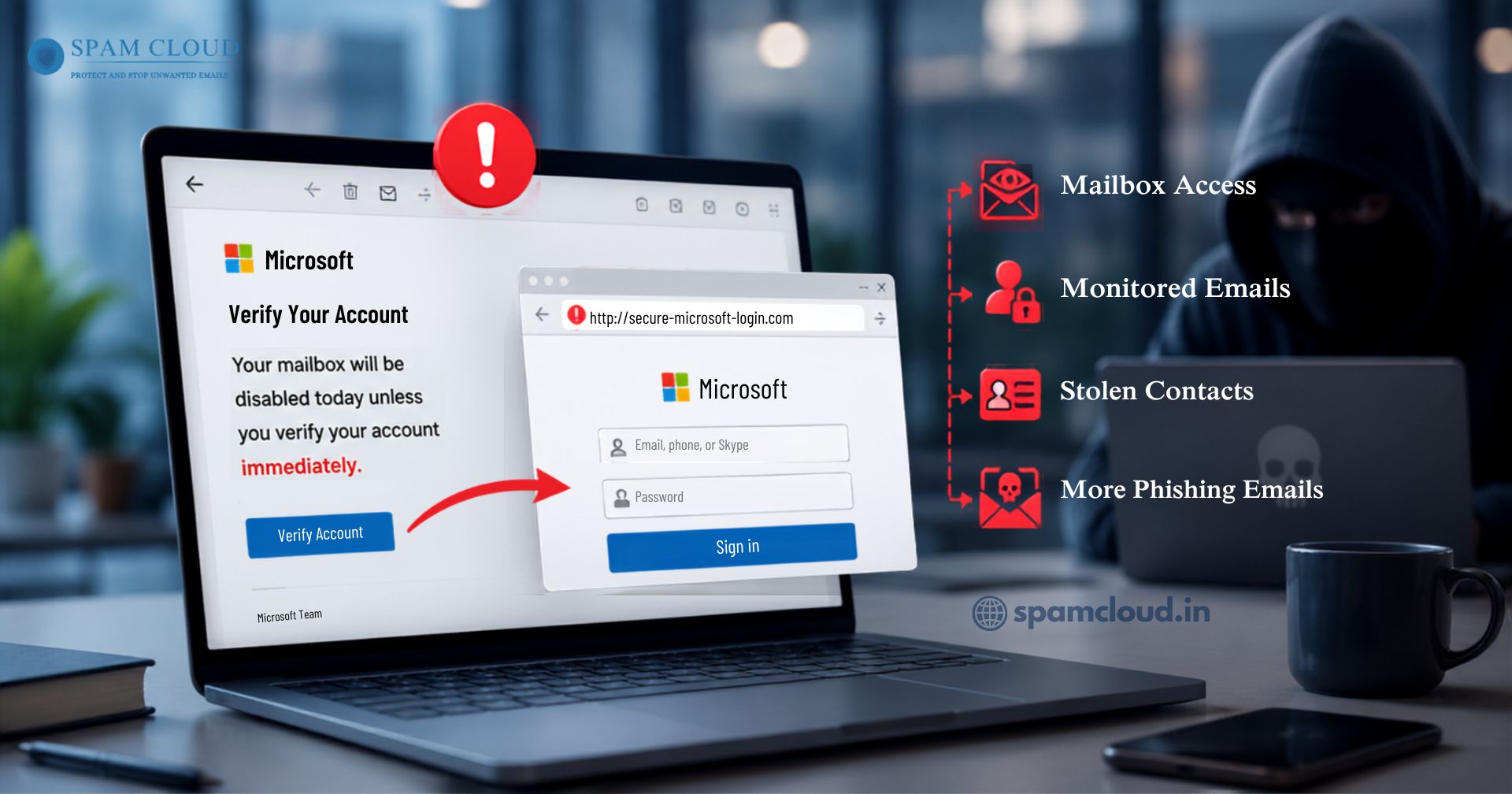
Within minutes:
Attackers gain access to the mailbox.
Internal emails are monitored.
Customer contacts are stolen.
More phishing emails are sent from the compromised account.
This example shows how email and phishing can quickly lead to a wider organizational security breach if proper email protection is not in place.
Business Risks of Email Phishing Attacks
Organizations face far more than temporary inconvenience.
Potential consequences include:
Financial losses
Identity theft
Data breaches
Customer trust issues
Regulatory penalties
Ransomware infections
Operational downtime
Intellectual property theft
Recovering from successful email phishing attacks often requires significant time and financial investment.
Best Practices to Prevent Email Phishing Attacks
1. Implement Advanced Email Security
Use professional email filtering solutions that detect:
Malicious links
Dangerous attachments
Domain spoofing
Impersonation attempts
This is how email security gateways prevent phishing attack attempts before they reach users. By inspecting incoming emails in real time, identifying suspicious content, and blocking malicious messages, advanced email security gateways significantly reduce the risk of credential theft, malware infections, and other email based cyber threats. Advanced filtering blocks many threats before they reach users.
2. Enable Multi Factor Authentication (MFA)
Even if credentials are stolen, MFA provides an additional security layer that significantly reduces unauthorized access.
3. Train Employees Regularly
Human awareness remains one of the strongest defenses.
Training should include:
Recognizing phishing emails
Reporting suspicious messages
Safe attachment handling
Password hygiene
Secure browsing practices
Understanding email and phishing enables employees to make safer decisions every day.
4. Verify Financial Requests
Always confirm payment requests through:
Phone calls
Internal messaging
Approved verification procedures
Never rely solely on email instructions.
5. Keep Software Updated
Install security updates for:
Operating systems
Email clients
Browsers
Security applications
Many attacks exploit outdated software.
6. Monitor Email Activity
Security teams should regularly monitor
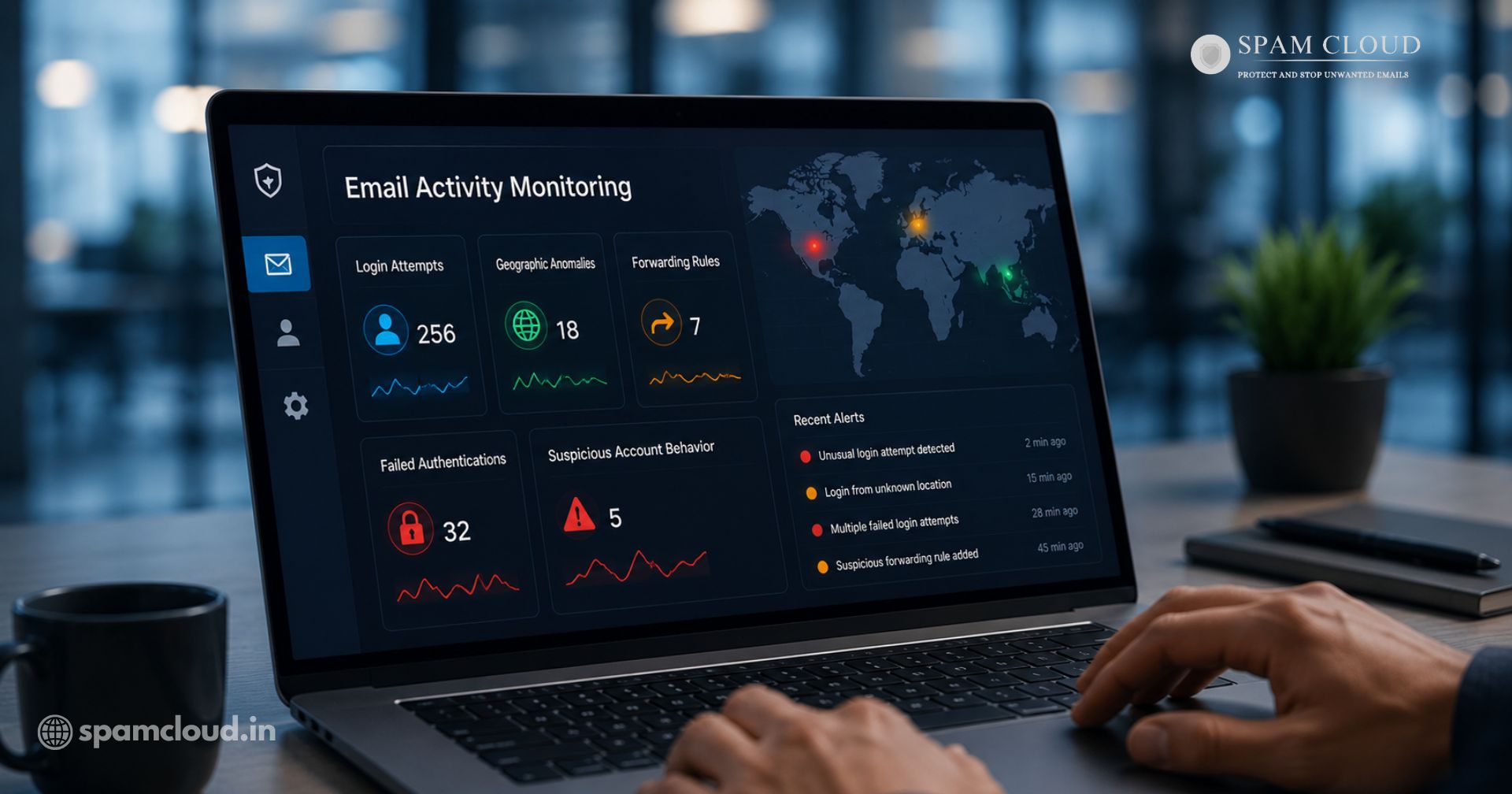
Login attempts
Geographic anomalies
Forwarding rules
Failed authentications
Suspicious account behavior
Continuous monitoring helps detect compromised accounts early.
Expert Tips for Better Protection
Technology alone cannot stop every phishing attempt. The strongest defense comes from combining advanced security tools with informed employees who know how to recognize suspicious emails. Understanding what is email security is essential it involves protecting email accounts, communications, and sensitive business information from phishing, malware, spam, and other cyber threats through multiple layers of security.
Here are some practical steps cybersecurity experts recommend:
Conduct regular phishing awareness and simulation training.
Use password managers to create and store strong, unique passwords.
Restrict administrative privileges to only those who need them.
Monitor for domain spoofing and email impersonation attempts.
Back up critical business data regularly.
Review and update email security policies on a routine basis.
Enable account activity alerts and multi factor authentication (MFA).
Businesses that combine employee awareness with proactive email security measures are far better equipped to defend against modern phishing attacks and reduce the risk of costly security incidents.
How SpamCloud Helps Prevent Email Phishing Attacks
Email phishing attacks continue to evolve, making traditional spam filters insufficient for modern businesses. SpamCloud provides a multi layered email security platform that helps organizations detect, block, and respond to phishing threats before they reach employees' inboxes. By combining intelligent filtering, threat detection, and advanced email protection, SpamCloud reduces the risk of credential theft, malware infections, and business email compromise.
1. Advanced Anti Phishing Protection
SpamCloud continuously analyzes incoming emails for phishing indicators, including suspicious links, spoofed domains, impersonation attempts, and malicious attachments. Emails identified as potential threats are blocked or quarantined before users can interact with them.
Key benefits include:
Detects phishing emails before delivery
Blocks malicious URLs and fake login pages
Prevents domain impersonation attacks
Reduces employee exposure to cyber threats
2. Outbound Email Protection
Compromised email accounts can unintentionally send phishing emails or spam to customers and partners. SpamCloud monitors outbound email traffic to detect suspicious activity and stop malicious emails before they damage your business reputation.
This helps:
Prevent outbound spam
Protect your domain reputation
Reduce the risk of email blacklisting
Maintain email deliverability
3. Real Time Threat Monitoring
Cyber threats change constantly. SpamCloud continuously monitors email traffic and identifies suspicious behavior in real time, allowing businesses to respond quickly to emerging phishing campaigns.
Real time monitoring enables organizations to:
Detect unusual email activity
Identify compromised accounts
Respond faster to phishing attempts
Improve overall email security posture
Protect Your Business with SpamCloud
Don't let phishing emails put your business at risk. SpamCloud provides advanced email security solutions to block phishing attacks, stop spam, and protect your business communications. Contact SpamCloud today to strengthen your email security.
Stay updated
Subscribe for new posts and insights.